HASHCORE TOOLKIT
HASHCORE TOOLKIT — Your reliable tool for managing and monitoring ASIC equipment.
The program offers a convenient and easy way to manage mining devices, providing complete control over equipment performance. With HASHCORE TOOLKIT, you can effortlessly monitor the condition of your devices, optimize their performance, and maintain system stability.
Choose your platform
How to find miners on your network
- Create a network group
Open Network groups and select + New group.
- Add the IP range
Select + Add IP range and enter the range used by your miners. If your devices use a custom password, enter it in Custom password.
- Scan for miners
Select Save and scan. Open the group to see detected devices, their status, and any reported errors.
Advantages of Toolkit
High performance
Maximize mining efficiency with optimized resource utilization and advanced algorithms.
Real-time diagnostics
Quickly identify and resolve issues with comprehensive real-time error monitoring.
Scalable solutions
Effortlessly scale operations from a single miner to a large mining farm.
Enhanced security
Protect your data and mining operations with advanced encryption and secure protocols.
Cloud integration
Manage and monitor your mining devices remotely through cloud-based tools.
Energy optimization
Reduce energy consumption with smart power management features.
System requirements
- OS: Windows 10/11, macOS 10.15+, Linux Ubuntu 20.04+.
- Processor: 2 GHz dual-core or better.
- RAM: 4 GB minimum.
- Storage: 500 MB free space.

Quick installation guide
- Download Toolkit. Choose your platform in Downloads.
- Install or unpack. Extract the ZIP archive on Windows or Linux and follow the included instructions where available. On an Apple device or Android, install from the linked store.
- Launch the app. Adjust your settings if needed, then create a network group to start discovering and managing miners.
Launching and main interface


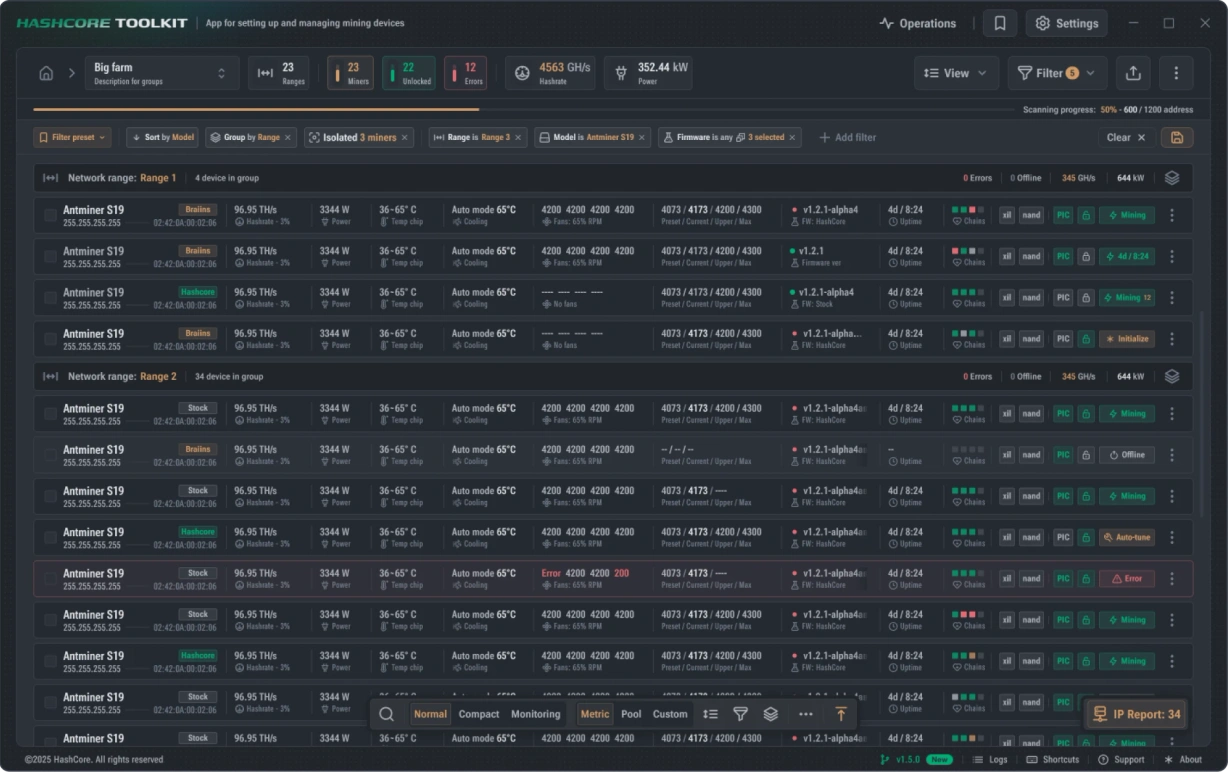
Toolkit opens to Network groups, where you can see your miner groups and device statuses, including errors. If you see Groups not defined, select + New group.
Set up a network group
The New group window has three tabs:
- Ranges — configure IP ranges and ports.
- Custom password — set device passwords.
- Custom timeout — adjust connection timeouts.
- Enter a Group name and an optional Group description.
- In Network ranges, select + Add IP range and enter the address range. Use + Add port range if needed.
- Select Save and scan to save the group and discover devices.
Monitoring and management
After the scan, open the group to check device status and performance, manage settings, and investigate errors.
Frequently asked questions
What is Hashcore Toolkit?
Hashcore Toolkit is an app for discovering, monitoring, and managing ASIC miners. It lets you organize devices into network groups and check their status from one interface.
Is Hashcore Toolkit free?
Yes. Hashcore Toolkit is free to download.
Which ASIC miners does Toolkit support?
Toolkit supports devices from Bitmain, Canaan, and MicroBT, including miners running Vnish firmware. Available features depend on the device model and firmware.
Which platforms is Toolkit available on?
Download Toolkit for Windows and Linux from this website, get it for iPhone, iPad, and Mac on the App Store, or install it on Android from Google Play.
How do I find miners on my network?
Open Network groups, select New group, and add the IP range your miners use. Then select Save and scan.
Can I organize miners into separate groups?
Yes. You can create separate groups for different network ranges, such as racks, rooms, or sites. Each group can have its own connection settings.
What can I monitor in Toolkit?
You can check miner status and performance and see which devices are reporting errors.
Can I copy settings to multiple miners?
Yes. Toolkit lets you copy a configuration from one miner to multiple compatible devices.
Can I install or update ASIC firmware with Toolkit?
Yes, on supported devices. Check that the firmware matches your miner model and control board before applying it.
Where can I get help?
Email info@hashcore.com. Include your Toolkit version, operating system, and miner model.